
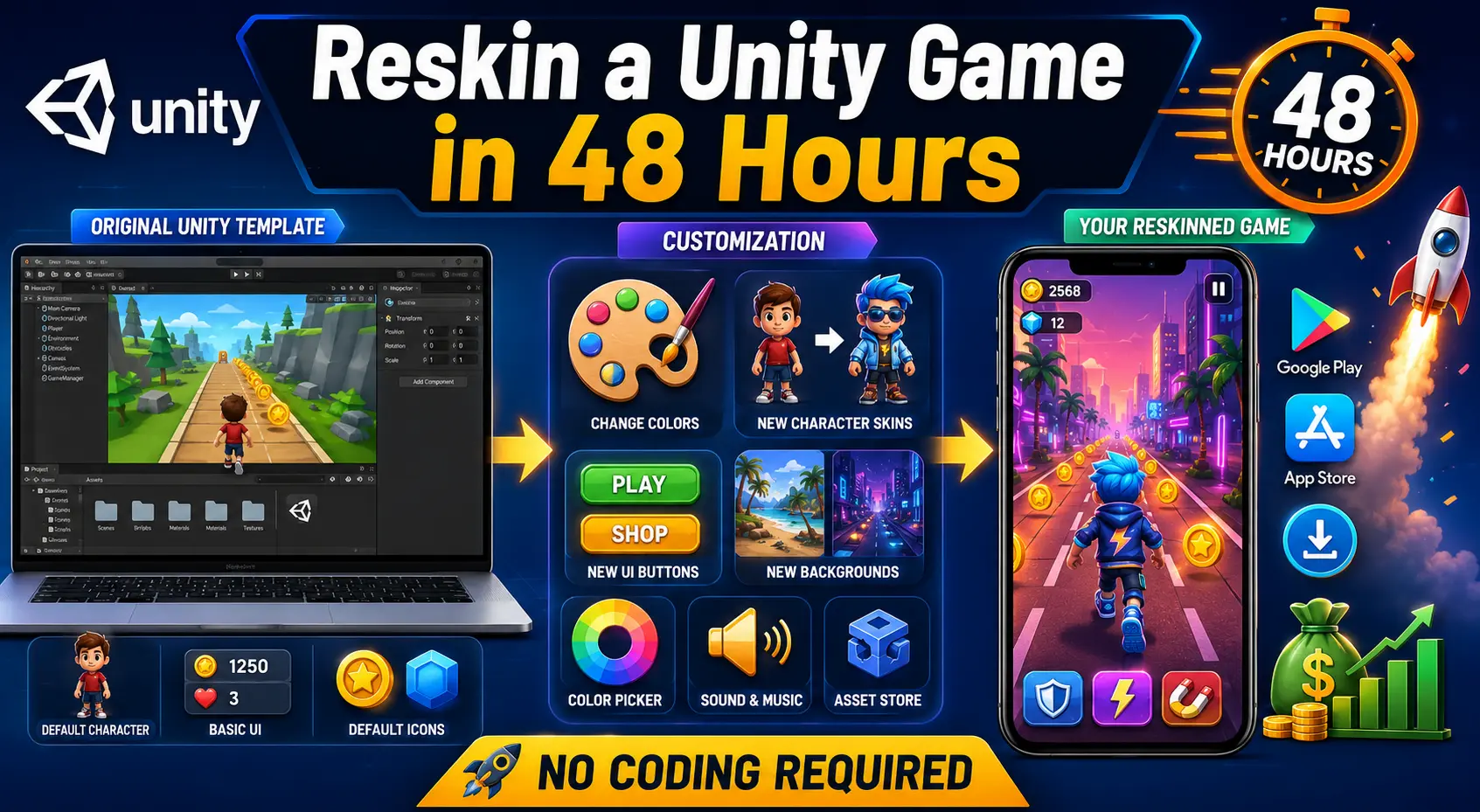
Every week, thousands of new mobile games flood the App Store and Google Play — and a surprising number of them were never coded from scratch. They started life as a Unity game template, got a fresh coat of paint, and launched as a brand-new title in under two days. This process is called reskinning, and it's one of the fastest, most beginner-friendly ways to enter the mobile game business without writing a single line of code.
If you've ever wondered how solo developers and small studios pump out hyper-casual games so quickly, this guide will show you exactly how it's done. By the end of this article, you'll understand what reskinning actually means, why it works, and how you can reskin your own Unity game template in under 48 hours — even if you've never opened Unity before.
Let's dive in.
Reskinning is the process of taking an existing, fully functional Unity game template — one that already has working gameplay, mechanics, and code — and changing its visual identity. That includes the art, characters, backgrounds, UI, sound effects, app icon, and branding, without touching the underlying logic that makes the game work.
Think of it like buying a pre-built house and repainting the walls, replacing the furniture, and putting up new curtains. The plumbing and electrical wiring (the code) stay exactly the same. Only the appearance changes.
This is why reskinning has become the go-to strategy for:
Because the core mechanics are already built, tested, and optimized, you skip the hardest and most time-consuming part of game development entirely. All that's left is creative work — and that's something almost anyone can do with the right tools.
Building a game from zero typically takes weeks or months, even for a simple hyper-casual title. You need to design mechanics, write and debug code, build a UI system, integrate ads, test on multiple devices, and fix countless bugs along the way.
Reskinning eliminates almost all of that. Here's why it's so efficient:
1. The hardest problems are already solved. Physics, collision detection, level progression, scoring systems, and win/lose conditions are already coded and tested inside a good Unity game template.
2. You only need design skills, not programming skills. Swapping sprites, changing colors, and replacing 3D models doesn't require understanding C# scripts — just drag-and-drop familiarity with the Unity Editor.
3. Templates are built for reuse. Quality templates are structured with organized folders, clearly labeled assets, and modular prefabs specifically so they can be reskinned quickly and repeatedly.
4. Monetization is often pre-integrated. Many templates already include ad network hooks, in-app purchase structures, and analytics, meaning you're not starting monetization from scratch either.
This combination is exactly why reskinning has become such a popular business model, particularly in the hyper-casual gaming space, where speed to market often matters more than originality.
Yes — as long as you're using a template that's licensed for reskinning and resale. Reputable marketplaces sell Unity source code specifically for this purpose, with licenses that permit you to modify, rebrand, and publish the game as your own. Always check the license terms before publishing, but templates purchased from legitimate source code stores are designed exactly for this use case.
What you should avoid is taking someone else's published game, ripping its assets without permission, and republishing it — that's a copyright violation. Buying a legally licensed template is a completely different (and fully legitimate) practice used across the industry.
Before jumping into the 48-hour timeline, gather these essentials:
Having all of this ready before you open Unity is what actually makes the 48-hour timeline realistic. Most delays happen because people start hunting for assets halfway through the process.
Not all templates are created equal. Picking the right one is arguably the most important decision in this entire process, because a messy or poorly coded template will cost you far more time than it saves.
Here's what to look for:
Even though you won't be writing code, the template still needs to be structured logically so that swapping assets doesn't accidentally break something. Look for templates with clearly named scripts, organized folders, and separation between game logic and visual assets.
Hyper-casual and casual mechanics tend to reskin the fastest because they're built around one or two core actions. Puzzle, arcade, and skill-based mechanics are especially popular for rapid reskinning projects.
A great template already has placeholders for banner ads, interstitials, and rewarded video, so you're not integrating an SDK from scratch. This alone can save you many hours.
Certain genres consistently perform well for reskinned releases because their gameplay loops are simple but addictive. Some strong examples worth exploring include:
You can browse a wider selection of ready-to-reskin options in the games category, where templates are organized by genre and gameplay style, making it easier to find one that matches your creative vision.
If you're unsure which mechanics tend to perform best right now, it's worth reading up on current market trends before committing to a template — for example, checking out the top hyper-casual Unity game source codes of 2026 can give you a clear sense of what's trending and what players are downloading.
Here's a realistic, hour-by-hour breakdown of how to reskin a Unity game template from start to finish, assuming focused work across two days.
Before opening Unity, decide on your game's new theme, target audience, and visual style. Sketch out (even roughly) how your app icon, main menu, and characters should look. A clear creative direction now prevents wasted time later.
Collect or create every visual and audio asset you'll need:
Organize these into folders that mirror the template's existing asset structure — this makes the import process much smoother.
Open Unity Hub, create a new project (or open the template directly if it comes pre-packaged), and let Unity import all the original assets and scripts. Take time here to explore the folder structure and understand where art assets live versus where scripts live — you won't need to touch the scripts, but knowing the layout saves confusion later.
This is the heart of the reskinning process. Systematically go through each scene and:
Work scene by scene rather than jumping around randomly — it's far easier to track your progress and spot missed assets this way.
Swap in your new sound effects and background music, update the app name within the project settings, and replace the splash screen and loading assets with your new branding.
Design your app icon in multiple required resolutions, along with screenshots and promotional graphics for the app store listing. This step is often overlooked but has a major impact on downloads and conversion rates.
If your template supports it, configure your ad network IDs and test that ads display correctly. Many creators use AdMob for this step since it integrates smoothly with most Unity templates — and if you need a refresher, there's a detailed walkthrough on how to integrate AdMob into a Unity game template that covers the entire setup process step by step.
Build the game to at least one physical device (or emulator) and play through every level, menu, and interaction. Check for:
Fix any bugs found during testing, do a final visual pass, and generate your build files (APK/AAB for Android, or an Xcode project for iOS). If you're targeting iOS, it's worth reviewing a guide on how to launch a Unity game on iOS in 2026 before you submit, since Apple's submission requirements are stricter and more detail-sensitive than Android's.
Even with a solid roadmap, beginners often run into the same pitfalls. Here's what to watch out for:
Skipping the planning phase. Jumping straight into Unity without a clear creative direction leads to inconsistent art styles and wasted rework.
Using low-resolution or mismatched assets. Art that doesn't fit the original template's aspect ratios or resolution can look stretched or blurry, hurting your game's perceived quality.
Ignoring different screen sizes. A UI that looks perfect on one device can break entirely on another. Always test on multiple resolutions.
Forgetting to update metadata. Package names, app names, bundle IDs, and version numbers all need to be updated — publishing with the original template's default metadata is a common (and easily avoidable) mistake.
Not testing ad integration thoroughly. Broken or missing ads directly hurt your revenue, so this step deserves extra attention before launch.
Choosing an overly complex template for a first project. If you're new to reskinning, start with a simpler mechanic before attempting something with multiple systems and features.
This is one of the most common questions from beginners, and the honest answer is: it depends heavily on your genre choice, marketing, ad optimization, and app store visibility. Some reskinned hyper-casual games generate modest side income, while well-marketed titles in trending genres have earned developers significant recurring revenue through ad monetization and in-app purchases.
Rather than guessing, it's worth reading a full breakdown of how much you can earn selling a reskinned Unity game, which walks through real earning models, monetization strategies, and what separates high-performing reskins from ones that flop.
Reskinning thousands of generic clones is easy — reskinning one that actually performs well takes a bit more thought. Keep these tips in mind:
For a basic reskin, no. Swapping sprites, materials, audio clips, and UI elements is entirely achievable through Unity's drag-and-drop Inspector and Editor windows. However, having a very basic understanding of how Unity's Inspector and Prefab system works will make you significantly faster and more confident, even if you never touch a script file.
If you eventually want to add new features beyond a simple reskin — like a new power-up or an additional game mode — that's when basic scripting knowledge becomes useful. But for the core reskinning process described in this guide, no coding is required.
Reskinning a Unity game template is one of the most accessible entry points into mobile game development today. With the right template, a clear plan, and focused execution, it's entirely realistic to go from a blank creative slate to a fully rebranded, playable game in under 48 hours — no programming experience required.
The key is preparation: choose a clean, well-structured template, gather your assets before you start, follow a structured timeline, and test thoroughly before publishing. Once you've reskinned your first game, the process gets faster and more intuitive with every project after that.
If you're ready to get started, you can explore a full library of ready-to-reskin templates at Unity Source Code and find the perfect starting point for your first (or next) game.
Q1: What is reskinning in Unity game development? Reskinning is the process of changing a Unity game template's visual assets — such as characters, backgrounds, UI, and branding — while keeping its original code and mechanics intact. It allows developers to create a "new" game quickly without building gameplay systems from scratch.
Q2: Can I really reskin a Unity game without knowing how to code? Yes. Most reskinning work involves replacing sprites, 3D models, audio files, and UI elements using Unity's Editor, which relies on drag-and-drop functionality rather than scripting. Basic Unity Editor familiarity is helpful, but writing or editing code isn't required for a standard reskin.
Q3: How long does it actually take to reskin a Unity game? With a well-organized template and all your assets prepared in advance, a simple hyper-casual or casual game can realistically be reskinned in 48 hours. More complex templates with multiple systems or larger asset libraries may take longer.
Q4: Where can I find Unity templates that are legal to reskin and resell? Look for marketplaces that explicitly sell source code with reskin and resale licenses, such as the games category on Unity Source Code, where templates are built specifically for this purpose.
Q5: What's the best genre for a beginner's first reskin project? Simple, single-mechanic genres like puzzle, arcade, or casual skill games tend to be the easiest to reskin because they have fewer systems and assets to replace. Templates like a snake-style puzzle game or a word connect game are great starting points for first-time reskinners.
Q6: How do I monetize a reskinned Unity game? Most reskinned games are monetized through ad networks like AdMob (banner, interstitial, and rewarded video ads) or in-app purchases. Many templates come with monetization systems pre-integrated, and you can follow a step-by-step guide on integrating AdMob into a Unity template to set this up correctly.
Q7: Can I publish a reskinned game on both Android and iOS? Yes, as long as your template license permits it. Android tends to have a faster, more lenient submission process, while iOS requires more careful attention to Apple's guidelines — it's worth reviewing an iOS launch guide before submitting to avoid rejections.
Q8: How much money can I make from a reskinned game? Earnings vary widely based on genre popularity, marketing effort, ad optimization, and app store visibility. Some reskins generate modest passive income, while well-optimized titles in trending genres can produce substantial recurring revenue through ads and in-app purchases.
Q9: What's the biggest mistake beginners make when reskinning a game? Skipping the planning phase and diving straight into Unity without a clear creative direction, asset plan, or theme. This usually leads to inconsistent visuals, wasted time, and a longer, messier process overall.
Q10: Do I need a Unity Pro license to reskin and publish games? No, Unity's free Personal plan is sufficient for most beginner and small studio projects, as long as your revenue and funding stay under Unity's eligibility thresholds. Always check Unity's current licensing terms before publishing commercially.



