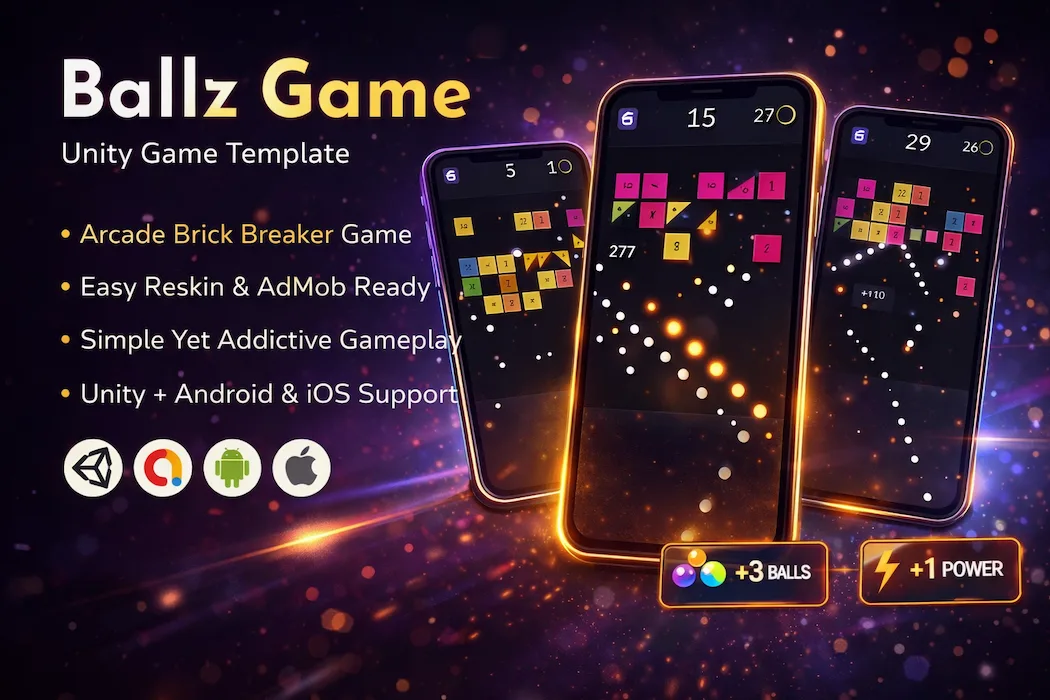

Some game mechanics are so simple and so satisfying that they outlive every trend cycle around them. Ballz is one of those mechanics. Aim. Shoot. Break numbered blocks before they reach the bottom. That's the entire premise — and it's exactly why this format has remained one of the most consistently downloaded arcade concepts on mobile app stores for years.
This Ballz Unity game template gives developers a complete, production-ready implementation of that mechanic: physics-driven ball trajectories, a progressive difficulty system, full AdMob monetization integration, and a codebase clean enough to reskin into a genuinely unique product within days, not months. If you've been searching for a Unity arcade game source code, a block breaker game template, or simply a low-risk, high-replay mechanic to add to your portfolio, this is one of the most proven starting points available.
This article walks through exactly what makes the Ballz mechanic so effective, what's included in the source code, how to customize it, and how it can anchor a broader, more diversified Unity game portfolio.
Before breaking down features, it's worth understanding why this specific arcade format has shown such remarkable staying power. Ballz succeeds because it strips gameplay down to its purest form: aim, shoot, watch the outcome, adjust. There's no tutorial required, no menu to navigate before the first shot, and no learning curve standing between installation and genuine engagement.
That immediacy is the entire value proposition. Most successful arcade and puzzle mechanics share this trait — instant comprehension paired with a skill ceiling that rewards repeated play. It's the same underlying principle behind logic-based titles like a Connect Lines Puzzle Unity game, where the rules are immediately clear but mastering efficient solutions takes real practice. Different genre, same psychological hook: simple to start, genuinely rewarding to get good at.
Every shot in Ballz is designed to feel responsive and rewarding. The physics-based ball movement, combined with clean visual feedback on every block break, creates a tactile, satisfying experience that's immediately understandable but never feels shallow.
Players grasp the core mechanic within seconds, but mastering shot angles, ricochet planning, and multi-ball strategy adds real depth that keeps sessions engaging well beyond the first few rounds. This is the balance every arcade game developer chases — low barrier to entry, high ceiling for skill expression — and it's already fully implemented and tuned in this codebase.
This is a complete, ready-to-use Unity project — not a partial build requiring extensive additional development. The package includes:
✅ Full Unity source code with a clean, organized project structure ✅ Addictive ball-shooting and block-breaking mechanics, fully implemented ✅ Smooth physics and responsive controls tuned for mobile input ✅ Progressive scoring system with built-in difficulty scaling ✅ Integrated AdMob support — both interstitial and rewarded ad placements ✅ Easy reskin structure for UI, balls, and blocks ✅ Mobile-optimized performance across a wide range of devices ✅ Cross-platform support for both Android and iOS ✅ Lightweight build with fast loading speed ✅ Publish-ready configuration for the Play Store and App Store
Every system is built with clean, well-commented C# code, meaning developers don't need to reverse-engineer a tangled codebase before they can start customizing.
One of the strongest advantages of working with a proven arcade mechanic like this is how quickly it becomes a genuinely distinct product. The customization path is direct:
Because the reskin layer is cleanly separated from the underlying physics and scoring logic, none of this customization requires touching core gameplay code — which means a single codebase can realistically produce several visually distinct releases.
Instead of building ball physics, collision detection, and scoring systems from scratch — work that easily takes weeks even for an experienced Unity developer — this template gives you a fully working system from the first import. That time savings gets redirected toward what actually matters for a successful launch: visual polish, branding, ad placement tuning, and player feedback.
This is precisely the kind of leverage that makes ready-made source code such a strong starting point for indie developers and small studios working with limited time and budget. If you're thinking beyond a single release and want to understand how a title like this can actually generate sustainable income once published, our guide on how to make money with Unity games breaks down the practical monetization strategies — ad placement timing, IAP structuring, and audience targeting — that apply directly to arcade titles like this one.
While the base template is fully playable and publish-ready as-is, the architecture is built to support meaningful expansion. Developers looking to differentiate their release further can layer on:
✅ Power-ups or special balls that introduce short-term strategic variety
✅ New block types or patterns to keep long-term players engaged
✅ Enhanced visual effects and animations for a more premium feel
✅ Performance optimizations to widen compatibility across lower-end devices
None of these additions require restructuring the existing scoring or physics systems — they layer naturally on top of a foundation that's already solid.
This project is built to serve a genuinely wide range of developers:
Smart developers rarely stake their entire release strategy on a single genre. Most build a varied catalog that captures different player moods and demographics, reducing dependency on any one title's performance. If Ballz is your flagship arcade release, a few genre-different additions can meaningfully widen your audience:
Combining a precision arcade title like this with cooking-simulation and crowd-runner mechanics gives you genuine portfolio breadth: three distinct player psychographics covered by titles built on proven, well-tested mechanics rather than experimental concepts.
The path from template to live release is intentionally short:
Because monetization is already implemented at the code level, there's no need to build ad logic from scratch — developers simply plug in their own credentials and adjust placement timing as needed. For a deeper look at structuring that monetization strategy for maximum return, the breakdown in how to make money with Unity games is worth reviewing before you finalize your ad placement plan.
The Ballz Unity Game Template – Addictive Arcade Source Code with AdMob Integration gives developers a strong, proven foundation for one of mobile gaming's most enduring arcade formats. With smooth physics-driven gameplay, a clean and modular codebase, full reskin flexibility, and monetization already built in, it removes the heaviest technical lifting from development — leaving you free to focus on what actually makes your version stand out in a crowded market.
Whether you're publishing your first arcade title, expanding an existing game catalog, or delivering a project for a client, Ballz offers a dependable, production-ready starting point with a track record of genre staying power that few mechanics can match.
⚙️ Requirements: Unity 2019.4.22f1 or newer version macOS and Xcode required for iOS builds
Need technical assistance? Reach out to the Unity Source Code support team for help with setup, customization, or publishing.
🌟🌟🌟🌟🌟 Enjoyed building with this template? Don't forget to leave a review — it helps other developers find it too.
You need to login to comment!
Total Sold:
0
Total Comments: